


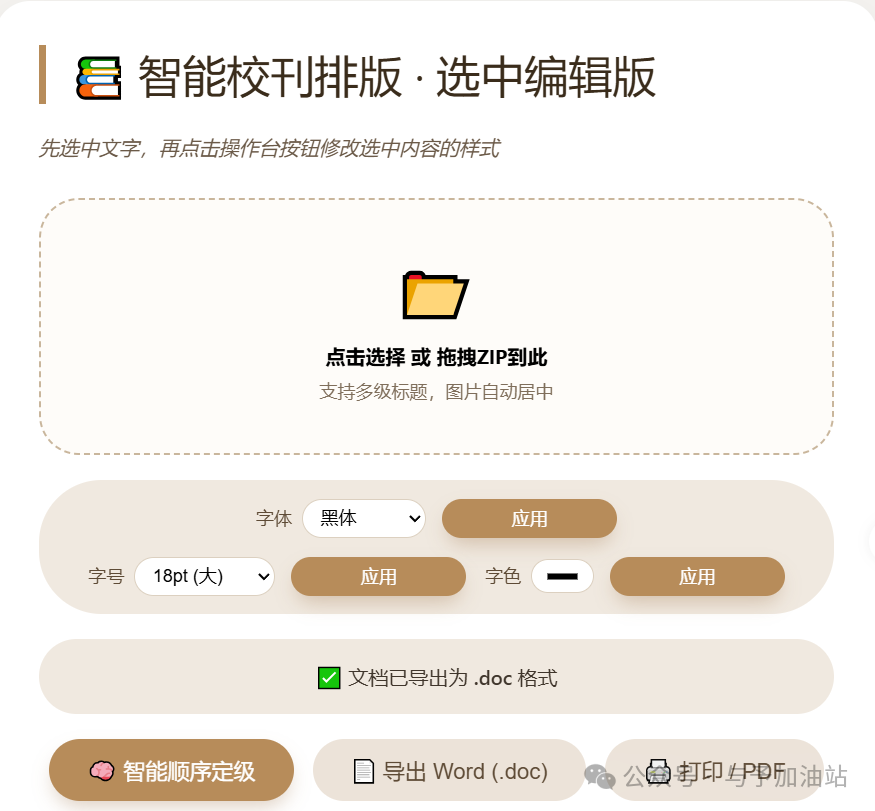
本工具旨在帮助您快速整理老师们提交的德育案例、校刊稿件、教学手册等 Word 文档,自动识别标题层级,并允许您对文字样式进行局部调整,最终导出格式规范的 Word 或 PDF 文件。
✨ 主要功能:
支持上传 ZIP 压缩包(内含 .docx 文件或嵌套 ZIP),自动解压并提取所有文档。自动识别常见的标题序号(如“一、”“(一)”“1.”“1.1”等)及无序号标题(如“背景:”“总结”),并按首次出现顺序分配层级。在预览区可以直接修改文字内容(点击文字即可编辑)。用鼠标选中文字后,可通过操作台单独修改选中部分的字体、字号、颜色。将当前预览内容(含图片、样式)导出为 .doc 文件,可用 Microsoft Word 打开。通过浏览器打印功能生成 PDF 文件,保留所有排版和图片。
<!DOCTYPE html>
<html lang="zh">
<head>
<meta charset="UTF-8">
<meta name="viewport" content="width=device-width, initial-scale=1.0">
<title>智能校刊排版 · 选中编辑版</title>
<style>
* { box-sizing: border-box; }
body {
font-family: 'Segoe UI', Roboto, 'Helvetica Neue', sans-serif;
background-color: #f5f3f0;
margin: 0;
min-height: 100vh;
display: flex;
align-items: center;
justify-content: center;
padding: 20px;
}
.card {
max-width: 1300px;
width: 100%;
background: white;
border-radius: 28px;
box-shadow: 0 25px 50px -12px rgba(0,0,0,0.3);
padding: 35px;
}
h1 {
margin-top: 0;
color: #3a2c1b;
font-weight: 400;
border-left: 6px solid #b78c5a;
padding-left: 20px;
font-size: 2.2rem;
}
.sub {
color: #6b5a48;
margin-bottom: 30px;
font-style: italic;
}
.upload-area {
border: 2px dashed #c9b69c;
border-radius: 32px;
padding: 40px 20px;
text-align: center;
background: #fefcf9;
transition: background 0.2s;
cursor: pointer;
}
.upload-area:hover { background: #f9f3ea; }
.upload-icon { font-size: 48px; margin-bottom: 10px; color: #b78c5a; }
/* 操作台样式 */
.toolbar {
background: #f0e9e0;
border-radius: 50px;
padding: 15px 25px;
margin: 20px 0;
display: flex;
flex-wrap: wrap;
gap: 15px;
align-items: center;
justify-content: center;
}
.tool-item {
display: flex;
align-items: center;
gap: 8px;
}
.tool-item label {
font-weight: 500;
color: #5e4b36;
font-size: 0.9rem;
}
.tool-item select, .tool-item input[type="number"], .tool-item input[type="color"] {
padding: 6px 10px;
border: 1px solid #dcd0c0;
border-radius: 30px;
background: white;
font-size: 0.9rem;
}
.tool-item input[type="number"] {
width: 70px;
}
.style-btn {
background: #b78c5a;
color: white;
border: none;
padding: 6px 18px;
border-radius: 30px;
cursor: pointer;
font-weight: 500;
font-size: 0.9rem;
margin-left: 5px;
}
.style-btn:hover {
background: #a07344;
}
.btn-group {
display: flex;
gap: 15px;
flex-wrap: wrap;
margin: 20px 0 20px;
justify-content: center;
}
button {
background: #b78c5a;
border: none;
color: white;
padding: 12px 30px;
border-radius: 40px;
font-size: 1.1rem;
font-weight: 500;
cursor: pointer;
box-shadow: 0 8px 16px -4px rgba(140,90,40,0.3);
transition: all 0.2s;
border: 1px solid transparent;
min-width: 140px;
}
button:disabled {
opacity: 0.4;
pointer-events: none;
filter: grayscale(0.5);
}
button.secondary {
background: #ece3d9;
color: #5e4b36;
box-shadow: none;
}
button.secondary:hover { background: #dfd2c2; }
button:hover { background: #a07344; transform: translateY(-2px); }
.preview {
background: #fefcf9;
border-radius: 20px;
border: 1px solid #e7dccc;
padding: 25px;
margin-top: 20px;
}
.preview h3 {
margin-top: 0;
color: #4e3e2b;
font-weight: 400;
display: flex;
align-items: center;
gap: 8px;
}
/* 预览容器 */
.preview-content {
background: white;
border-radius: 16px;
padding: 2cm 2cm 2cm 2cm;
max-height: 600px;
overflow-y: auto;
box-shadow: inset 0 0 0 1px #eee7de;
font-family: '宋体', 'SimSun', serif;
font-size: 10.5pt;
line-height: 1.5;
outline: none;
}
/* 标题样式(基础结构,字体大小固定) */
.preview-content .chapter-title {
font-family: '黑体', 'Hei', sans-serif;
font-size: 18pt;
font-weight: bold;
text-align: center;
margin: 24pt 0 18pt 0;
}
.preview-content .h1 {
font-family: '黑体', 'Hei', sans-serif;
font-size: 16pt;
font-weight: bold;
margin: 18pt 0 12pt 0;
}
.preview-content .h2 {
font-family: '黑体', 'Hei', sans-serif;
font-size: 14pt;
font-weight: bold;
margin: 12pt 0 6pt 0;
}
.preview-content .h3 {
font-family: '黑体', 'Hei', sans-serif;
font-size: 12pt;
font-weight: bold;
margin: 6pt 0 3pt 0;
}
.preview-content .h4 {
font-family: '黑体', 'Hei', sans-serif;
font-size: 11pt;
font-weight: bold;
margin: 3pt 0 3pt 0;
}
.preview-content .h5 {
font-family: '黑体', 'Hei', sans-serif;
font-size: 10.5pt;
font-weight: bold;
margin: 3pt 0 3pt 0;
}
.preview-content p {
font-family: '宋体', 'SimSun', serif;
font-size: 10.5pt;
line-height: 1.5;
margin: 0 0 0 0;
text-indent: 2em;
text-align: justify;
}
.preview-content .image-container {
text-align: center;
margin: 12pt 0;
}
.preview-content .image-container img {
max-width: 100%;
height: auto;
display: block;
margin: 0 auto;
}
.status {
margin: 15px 0;
padding: 12px;
border-radius: 40px;
background: #f0e9e0;
color: #3f352b;
text-align: center;
font-weight: 500;
min-height: 60px;
display: flex;
align-items: center;
justify-content: center;
word-break: break-word;
}
.footer-note {
margin-top: 20px;
font-size: 0.8rem;
color: #9b8c7a;
text-align: center;
}
hr { border: none; border-top: 1px solid #e2d7cb; margin: 20px 0; }
@media print {
body * { visibility: hidden; }
.printable-area, .printable-area * { visibility: visible; }
.printable-area {
position: absolute;
left: 0;
top: 0;
width: 100%;
background: white;
padding: 2cm 2cm 2cm 2cm !important;
margin: 0;
box-shadow: none;
max-height: none;
overflow: visible;
}
.toolbar, .btn-group, .upload-area, .preview h3, .status, .footer-note, hr {
display: none !important;
}
}
</style>
<!-- 核心库 -->
<script src="https://cdnjs.cloudflare.com/ajax/libs/jszip/3.10.1/jszip.min.js"></script>
<script>if (typeof JSZip === 'undefined') document.write('<script src="https://unpkg.com/jszip@3.10.1/dist/jszip.min.js"><\/script>');</script>
<script src="https://cdnjs.cloudflare.com/ajax/libs/mammoth/1.6.0/mammoth.browser.min.js"></script>
<script>if (typeof mammoth === 'undefined') document.write('<script src="https://unpkg.com/mammoth@1.6.0/mammoth.browser.min.js"><\/script>');</script>
<script src="https://cdnjs.cloudflare.com/ajax/libs/FileSaver.js/2.0.5/FileSaver.min.js"></script>
<script>if (typeof saveAs === 'undefined') document.write('<script src="https://unpkg.com/file-saver@2.0.5/dist/FileSaver.min.js"><\/script>');</script>
</head>
<body>
<div class="card">
<h1>📚 智能校刊排版 · 选中编辑版</h1>
<div class="sub">先选中文字,再点击操作台按钮修改选中内容的样式</div>
<!-- 上传区域 -->
<div class="upload-area" id="dropZone">
<div class="upload-icon">📂</div>
<div><strong>点击选择 或 拖拽ZIP到此</strong></div>
<div style="font-size:0.9rem; margin-top:8px; color:#7f6e5b;">支持多级标题,图片自动居中</div>
<input type="file" id="fileInput" accept=".zip,application/zip" style="display:none;">
</div>
<!-- 操作台(选中编辑版) -->
<div class="toolbar" id="toolbar">
<div class="tool-item">
<label>字体</label>
<select id="fontSelect">
<option value="宋体">宋体</option>
<option value="黑体">黑体</option>
<option value="楷体">楷体</option>
<option value="仿宋">仿宋</option>
<option value="微软雅黑">微软雅黑</option>
</select>
<button class="style-btn" id="applyFontBtn">应用</button>
</div>
<div class="tool-item">
<label>字号</label>
<select id="fontSizeSelect">
<option value="1">8pt (极小)</option>
<option value="2">10pt (小)</option>
<option value="3" selected>12pt (正常)</option>
<option value="4">14pt (中)</option>
<option value="5">18pt (大)</option>
<option value="6">24pt (很大)</option>
<option value="7">36pt (极大)</option>
</select>
<button class="style-btn" id="applySizeBtn">应用</button>
</div>
<div class="tool-item">
<label>字色</label>
<input type="color" id="colorInput" value="#000000">
<button class="style-btn" id="applyColorBtn">应用</button>
</div>
</div>
<!-- 状态和按钮组 -->
<div class="status" id="statusMsg">⏳ 等待上传压缩包</div>
<div class="btn-group">
<button id="processBtn" disabled>🧠 智能顺序定级</button>
<button id="downloadWordBtn" disabled class="secondary">📄 导出 Word (.doc)</button>
<button id="printPdfBtn" disabled class="secondary">🖨️ 打印 / PDF</button>
</div>
<!-- 预览区域 (可编辑) -->
<div class="preview">
<h3>🔍 可编辑预览 (选中文字后修改样式)</h3>
<div class="preview-content" id="previewContent" contenteditable="true">
<p style="color:#b7a48e; text-align:center;">上传并解析后点击「智能顺序定级」生成预览</p>
</div>
</div>
<div class="footer-note">※ 选中文字后点击操作台按钮,可单独修改选中部分的样式</div>
</div>
<script>
(function() {
// DOM 元素
const dropZone = document.getElementById('dropZone');
const fileInput = document.getElementById('fileInput');
const statusMsg = document.getElementById('statusMsg');
const processBtn = document.getElementById('processBtn');
const downloadWordBtn = document.getElementById('downloadWordBtn');
const printPdfBtn = document.getElementById('printPdfBtn');
const previewContent = document.getElementById('previewContent');
// 操作台按钮
const applyFontBtn = document.getElementById('applyFontBtn');
const applySizeBtn = document.getElementById('applySizeBtn');
const applyColorBtn = document.getElementById('applyColorBtn');
const fontSelect = document.getElementById('fontSelect');
const fontSizeSelect = document.getElementById('fontSizeSelect');
const colorInput = document.getElementById('colorInput');
// 全局数据
let chapters = [];
let hasError = false;
// ---------- 选中编辑功能 ----------
// 使用 mousedown 而不是 click,防止按钮点击导致选区丢失
applyFontBtn.addEventListener('mousedown', (e) => {
e.preventDefault(); // 阻止默认行为,避免失去焦点
const font = fontSelect.value;
document.execCommand('fontName', false, font);
});
applySizeBtn.addEventListener('mousedown', (e) => {
e.preventDefault();
const size = fontSizeSelect.value; // 1-7 的数字
document.execCommand('fontSize', false, size);
});
applyColorBtn.addEventListener('mousedown', (e) => {
e.preventDefault();
const color = colorInput.value;
document.execCommand('foreColor', false, color);
});
// ---------- 状态更新 ----------
function setStatus(msg, isError = false, isWarning = false) {
statusMsg.innerText = msg;
if (isError) {
statusMsg.style.background = '#ffded9';
statusMsg.style.color = '#b33c2f';
} else if (isWarning) {
statusMsg.style.background = '#fff3d6';
statusMsg.style.color = '#8a6d3b';
} else {
statusMsg.style.background = '#f0e9e0';
statusMsg.style.color = '#3f352b';
}
}
function escapeHtml(unsafe) {
return unsafe.replace(/[&<>"']/g, function(m) {
if(m === '&') return '&'; if(m === '<') return '<'; if(m === '>') return '>';
if(m === '"') return '"'; return ''';
});
}
function extractTitleFromFilename(path) {
let fileName = path.split('/').pop();
fileName = fileName.replace(/\.docx$/i, '').replace(/[_-]/g, ' ');
return fileName || '未命名案例';
}
// ---------- 递归解压ZIP ----------
async function extractAllFiles(zipFile) {
let fileEntries = [];
try {
const rootZip = await JSZip.loadAsync(zipFile);
const queue = [{ zip: rootZip, pathPrefix: '' }];
while (queue.length > 0) {
const { zip, pathPrefix } = queue.shift();
const entries = Object.keys(zip.files);
for (const relPath of entries) {
const zipEntry = zip.files[relPath];
if (zipEntry.dir) continue;
const fullPath = pathPrefix ? `${pathPrefix}/${relPath}` : relPath;
try {
if (relPath.toLowerCase().endsWith('.zip')) {
const data = await zipEntry.async('arraybuffer');
const nestedZip = await JSZip.loadAsync(data);
queue.push({ zip: nestedZip, pathPrefix: fullPath.replace(/\.zip$/i, '') });
} else {
const data = await zipEntry.async('arraybuffer');
fileEntries.push({ path: fullPath, data: data });
}
} catch (innerErr) {
console.warn('跳过文件:', fullPath, innerErr);
setStatus(`⚠️ 文件 ${fullPath} 解压失败,已跳过`, false, true);
}
}
}
} catch (err) {
throw new Error('解压失败: ' + err.message);
}
return fileEntries;
}
// 提取 HTML(含图片)
async function extractHtmlFromDocx(arrayBuffer) {
const result = await mammoth.convertToHtml({ arrayBuffer });
return result.value;
}
// 上传处理
async function handleFileUpload(file) {
setStatus('📦 正在解压...');
hasError = false;
try {
const allFiles = await extractAllFiles(file);
const docxFiles = allFiles.filter(f => f.path.toLowerCase().endsWith('.docx'));
if (docxFiles.length === 0) {
setStatus('❌ 未找到 .docx 文件', true);
return false;
}
setStatus(`🔍 找到 ${docxFiles.length} 个文档,提取中...`);
docxFiles.sort((a, b) => a.path.localeCompare(b.path, 'zh'));
const chapterPromises = docxFiles.map(async (file) => {
try {
const html = await extractHtmlFromDocx(file.data);
const plainText = html.replace(/<[^>]*>/g, '').replace(/\s+/g, ' ').trim();
const paragraphs = plainText.split(/\n/).filter(p => p.trim().length > 0);
return {
title: extractTitleFromFilename(file.path),
html: html,
paragraphs: paragraphs
};
} catch (err) {
console.error('解析失败:', file.path, err);
hasError = true;
return {
title: extractTitleFromFilename(file.path),
html: '<p>文档解析错误</p>',
paragraphs: ['[文档解析错误]']
};
}
});
chapters = await Promise.all(chapterPromises);
if (hasError) {
setStatus('✅ 解析完成(部分错误),可点击「智能顺序定级」', false, true);
} else {
setStatus(`✅ 解析完成,共 ${chapters.length} 章`);
}
return true;
} catch (err) {
setStatus('❌ 解压失败:' + err.message, true);
return false;
}
}
// ---------- 标题识别 ----------
const headingKeywords = [
'摘要','引言','前言','背景','目的','意义','对象','方法','过程','结果',
'分析','讨论','结论','建议','反思','总结','附录','参考文献','注','说明',
'关键词','概述','缘由','思路','举措','成效','思考','问题','对策','缘由',
'基本情况','主要做法','取得成效','存在不足','下一步打算','案例描述',
'案例反思','案例背景','案例过程','案例分析','案例启示','教育建议',
'教育对策','教育反思','教育叙事','教育案例','德育案例','管理案例'
];
function detectTitlePattern(text) {
const trimmed = text.trim();
if (!trimmed || trimmed.length > 80 || trimmed.length < 2) return null;
const patterns = [
{ name: 'chinese_num', regex: /^\s*[一二三四五六七八九十百千]+[、..]/ },
{ name: 'paren_chinese', regex: /^\s*[((][一二三四五六七八九十百千]+[))]/ },
{ name: 'arabic_num', regex: /^\s*\d+[、..]/ },
{ name: 'paren_arabic', regex: /^\s*[((]\d+[))]/ },
{ name: 'multi_arabic', regex: /^\s*\d+(\.\d+)+[\s\.::]?/ }
];
for (let p of patterns) if (p.regex.test(trimmed)) return p.name;
if (/[。!?;]$/.test(trimmed)) return null;
if (/[::]/.test(trimmed)) {
let parts = trimmed.split(/[::]/);
if (parts[0].length < 25) return 'plain_heading';
}
if (headingKeywords.includes(trimmed)) return 'plain_heading';
for (let kw of headingKeywords) if (trimmed.startsWith(kw) && trimmed.length < 30) return 'plain_heading';
return null;
}
function enhanceHeadingDetection(paragraphs) {
let candidates = [];
paragraphs.forEach((para, idx) => {
let pattern = detectTitlePattern(para);
if (pattern) candidates.push({ idx, pattern });
});
let order = [];
let seen = new Set();
candidates.forEach(c => {
if (!seen.has(c.pattern)) {
seen.add(c.pattern);
order.push(c.pattern);
}
});
const levelMap = {};
order.forEach((p, i) => {
if (i === 0) levelMap[p] = 'h1';
else if (i === 1) levelMap[p] = 'h2';
else if (i === 2) levelMap[p] = 'h3';
else if (i === 3) levelMap[p] = 'h4';
else levelMap[p] = 'h5';
});
let classified = paragraphs.map((text, idx) => {
let cand = candidates.find(c => c.idx === idx);
return { text, level: cand ? levelMap[cand.pattern] : 'body' };
});
for (let i = 0; i < classified.length; i++) {
if (classified[i].level === 'body') {
let t = classified[i].text;
if (t.length < 40 && !/[。!?;]$/.test(t)) {
let prevLevel = i > 0 ? classified[i-1].level : null;
let nextLevel = i < classified.length-1 ? classified[i+1].level : null;
if (prevLevel && prevLevel.startsWith('h')) {
classified[i].level = prevLevel;
} else if (nextLevel && nextLevel.startsWith('h')) {
classified[i].level = nextLevel;
}
}
}
}
return classified;
}
// 构建预览HTML
function buildPreviewHtmlFromChapters() {
if (!chapters.length) return '<p style="color:#b7a48e;">请先上传并解析文档</p>';
let html = '';
for (const ch of chapters) {
if (!ch.classified) continue;
html += `<div class="chapter-title">${escapeHtml(ch.title)}</div>`;
const tempDiv = document.createElement('div');
tempDiv.innerHTML = ch.html;
const children = Array.from(tempDiv.children);
if (children.length === ch.classified.length) {
for (let i = 0; i < children.length; i++) {
const elem = children[i];
const level = ch.classified[i].level;
if (level.startsWith('h')) {
const wrapper = document.createElement('div');
wrapper.className = level;
wrapper.innerHTML = elem.innerHTML;
html += wrapper.outerHTML;
} else {
html += elem.outerHTML;
}
}
} else {
let content = ch.html
.replace(/<h1>/g, '<div class="h1">').replace(/<\/h1>/g, '</div>')
.replace(/<h2>/g, '<div class="h2">').replace(/<\/h2>/g, '</div>')
.replace(/<h3>/g, '<div class="h3">').replace(/<\/h3>/g, '</div>')
.replace(/<h4>/g, '<div class="h4">').replace(/<\/h4>/g, '</div>')
.replace(/<h5>/g, '<div class="h5">').replace(/<\/h5>/g, '</div>')
.replace(/<h6>/g, '<div class="h5">').replace(/<\/h6>/g, '</div>')
.replace(/<img([^>]+)>/g, '<div class="image-container"><img$1></div>');
html += content;
}
html += `<div style="page-break-before: always; margin: 0;"></div>`;
}
return html;
}
function updatePreview() {
let html = buildPreviewHtmlFromChapters();
previewContent.innerHTML = html;
}
// 下载函数
function downloadBlob(blob, filename) {
return new Promise((resolve, reject) => {
try {
if (typeof window.saveAs === 'function') {
window.saveAs(blob, filename);
resolve();
} else {
const url = window.URL.createObjectURL(blob);
const a = document.createElement('a');
a.href = url;
a.download = filename;
document.body.appendChild(a);
a.click();
setTimeout(() => {
document.body.removeChild(a);
window.URL.revokeObjectURL(url);
resolve();
}, 100);
}
} catch (err) {
reject(err);
}
});
}
// 事件绑定
dropZone.addEventListener('click', () => fileInput.click());
dropZone.addEventListener('dragover', (e) => e.preventDefault());
dropZone.addEventListener('drop', async (e) => {
e.preventDefault();
const file = e.dataTransfer.files[0];
if (file && (file.type === 'application/zip' || file.name.endsWith('.zip'))) {
const success = await handleFileUpload(file);
if (success) {
processBtn.disabled = false;
downloadWordBtn.disabled = true;
printPdfBtn.disabled = true;
}
} else {
setStatus('请上传ZIP压缩包', true);
}
});
fileInput.addEventListener('change', async (e) => {
const file = e.target.files[0];
if (file) {
const success = await handleFileUpload(file);
if (success) {
processBtn.disabled = false;
downloadWordBtn.disabled = true;
printPdfBtn.disabled = true;
}
}
});
processBtn.addEventListener('click', () => {
if (!chapters.length) {
setStatus('请先上传有效压缩包', true);
return;
}
try {
for (let i = 0; i < chapters.length; i++) {
chapters[i].classified = enhanceHeadingDetection(chapters[i].paragraphs);
}
updatePreview();
downloadWordBtn.disabled = false;
printPdfBtn.disabled = false;
setStatus('🎯 标题识别完成,可选中文字修改样式');
} catch (err) {
setStatus('❌ 处理失败: ' + err.message, true);
}
});
// 导出 Word
downloadWordBtn.addEventListener('click', async () => {
if (!chapters.length) { setStatus('没有可导出的内容', true); return; }
setStatus('📄 正在准备导出 Word 文件...');
try {
const fullHtml = previewContent.innerHTML;
const styles = document.querySelector('style').innerHTML;
const fullDocument = `<!DOCTYPE html>
<html>
<head>
<meta charset="UTF-8">
<style>
${styles}
.preview-content { padding: 2cm; max-height: none; overflow: visible; }
body { margin: 0; background: white; }
</style>
</head>
<body>
<div class="preview-content">
${fullHtml}
</div>
</body>
</html>`;
const blob = new Blob([fullDocument], { type: 'application/msword' });
await downloadBlob(blob, '校刊排版.doc');
setStatus('✅ 文档已导出为 .doc 格式');
} catch (err) {
console.error(err);
setStatus('❌ 导出失败: ' + err.message, true);
}
});
// 打印 PDF
printPdfBtn.addEventListener('click', () => {
if (!chapters.length) { setStatus('没有可打印的内容', true); return; }
previewContent.classList.add('printable-area');
setTimeout(() => window.print(), 50);
window.addEventListener('afterprint', function onAfterPrint() {
previewContent.classList.remove('printable-area');
window.removeEventListener('afterprint', onAfterPrint);
});
});
// 初始预览
previewContent.innerHTML = '<p style="color:#b7a48e; text-align:center;">上传并解析后点击「智能顺序定级」预览</p>';
})();
</script>
</body>
</html>