找到
49
篇与
源码
相关的结果
- 第 6 页
-
 一个例子带着小白走进代码的世界——网页设计篇 在编程的世界里,每一行代码都如同构建数字世界的砖石,它们承载着逻辑、算法与创意,共同编织出软件与应用的宏伟蓝图。当你提出“帮我写段代码”的请求时,这不仅仅是一个简单的技术需求,更是一次深入探索编程艺术、解决实际问题或创造新事物的旅程。下面,我将以构建一个简单网页的JavaScript代码片段为例,带你走进编程的奇妙世界。 场景设定 假设我们需要创建一个简单的网页,该网页包含一个按钮,当用户点击这个按钮时,页面会显示当前的时间。这样的功能在日常生活中非常常见,比如显示新闻发布时间、用户登录时间等。接下来,我们将分步骤实现这一功能。 HTML结构 首先,我们需要定义网页的基本结构,即HTML部分。在这个例子中,我们将添加一个按钮(<button>)和一个用于显示时间的元素(<p>)。 <!DOCTYPE html> <html lang="en"> <head> <meta charset="UTF-8"> <meta name="viewport" content="width=device-width, initial-scale=1.0"> <title>显示时间</title> </head> <body> <button id="showTimeBtn">显示当前时间</button> <p id="timeDisplay">点击按钮查看时间</p> <!-- 引入JavaScript代码 --> <script src="script.js"></script> </body> </html>注意,<script src="script.js"></script>这一行告诉浏览器,JavaScript代码将存储在外部文件script.js中,这样做有助于保持HTML结构的清晰和JavaScript代码的可维护性。 JavaScript实现 接下来,我们在script.js文件中编写JavaScript代码,以实现点击按钮显示当前时间的功能。 // 获取按钮和时间显示元素的引用 const showTimeBtn = document.getElementById('showTimeBtn'); const timeDisplay = document.getElementById('timeDisplay'); // 为按钮添加点击事件监听器 showTimeBtn.addEventListener('click', function() { // 获取当前时间 const now = new Date(); // 格式化时间字符串 const formattedTime = now.toLocaleTimeString(); // 更新时间显示元素的内容 timeDisplay.textContent = formattedTime; });这段代码首先通过document.getElementById方法获取了页面上按钮和时间显示元素的引用。然后,使用addEventListener方法为按钮添加了一个点击事件监听器。当按钮被点击时,会执行一个匿名函数,该函数首先创建一个Date对象来获取当前时间,然后使用toLocaleTimeString方法将时间格式化为字符串(注意,这个时间格式会根据用户的地区设置有所不同),最后将这个格式化后的时间字符串设置为时间显示元素的文本内容。 深入理解 虽然这段代码看起来很简单,但它涵盖了JavaScript编程中的几个核心概念: DOM操作:通过document.getElementById等方法,我们可以访问和操作网页上的元素,这是JavaScript与HTML交互的基础。 事件监听:使用addEventListener方法可以为元素添加事件监听器,以便在特定事件发生时执行代码。这是实现交互式网页的关键。 日期和时间:Date对象提供了处理日期和时间的强大功能,包括获取当前时间、格式化时间等。 结论 通过上面的例子,我们不仅实现了一个简单的功能——点击按钮显示当前时间,还深入理解了JavaScript编程中的一些核心概念。编程不仅仅是编写代码,更是一种思考问题、解决问题的方式。
-
霓虹灯数字时钟(可复制源代码) nhd.gif图片 源码: <!DOCTYPE html> <html lang="en"> <head> <meta charset="UTF-8"> <meta name="viewport" content="width=device-width, initial-scale=1.0"> <title>霓虹灯数字时钟</title> <script src="https://cdnjs.cloudflare.com/ajax/libs/gsap/3.9.1/gsap.min.js"></script> <style> *{margin:0;padding:0;box-sizing:border}body{display:flex;justify-content:center;align-items:center;min-height:100vh;overflow:hidden;background:#2f363e}.clock{position:relative;width:280px;height:280px;display:flex;justify-content:center;align-items:center;scale:2;box-shadow:inset 5px 5px 25px rgba(0,0,0,0.25);border-radius:50%}#time{position:relative;width:250px;height:250px;display:flex;justify-content:center;align-items:center}#time .circle{position:absolute;display:flex;justify-content:center;align-items:center}#time .circle svg{position:relative;transform:rotate(270deg)}#time .circle:nth-child(1) svg{width:250px;height:250px}#time .circle:nth-child(2) svg{width:210px;height:210px}#time .circle:nth-child(3) svg{width:170px;height:170px}#time .circle svg circle{width:100%;height:100%;fill:transparent;stroke-width:5;stroke:var(--clr);transform:translate(5px,5px);opacity:0.25}#time .circle:nth-child(1) svg circle{stroke-dasharray:760;stroke-dashoffset:760}#time .circle:nth-child(2) svg circle{stroke-dasharray:630;stroke-dashoffset:630}#time .circle:nth-child(3) svg circle{stroke-dasharray:510;stroke-dashoffset:510}.dots{position:absolute;width:100%;height:100%;display:flex;align-items:flex-start;justify-content:center;z-index:10}.dots::before{content:"";position:absolute;top:-3px;width:15px;height:15px;background:var(--clr);border-radius:50%;box-shadow:0 0 20px var(--clr),0 0 40px var(--clr),0 0 60px var(--clr),0 0 80px var(--clr)}.niddles{position:absolute;width:200px;height:200px;border-radius:50%;display:flex;justify-content:center;align-items:flex-start;z-index:10}.niddles i{position:absolute;width:2px;background:var(--clr2);height:50%;opacity:0.75;border-radius:6px;transform-origin:bottom;transform:scaleY(0.5)}.niddles.niddles2{width:170px;height:170px;z-index:9}.niddles.niddles2 i{width:3px}.niddles.niddles3{width:140px;height:140px;z-index:8}.niddles.niddles3 i{width:4px}#time span{position:absolute;inset:55px;text-align:center;color:#999;font-family:Cambria,Cochin,Georgia,Times,"Times New Roman",serif;transform:rotate(calc(30deg * var(--i)))}#time span b{font-size:0.75em;font-weight:500;display:inline-block;transform:rotate(calc(-30deg * var(--i)))} </style> </head> <body> <div class="clock"> <div id="time"> <div class="circle" style="--clr:#ff2972"> <div class="dots sec_dot"></div> <svg> <circle cx="120" cy="120" r="120" id="ss"></circle> </svg> </div> <div class="circle" style="--clr:#fee800"> <div class="dots min_dot"></div> <svg> <circle cx="100" cy="100" r="100" id="mm"></circle> </svg> </div> <div class="circle" style="--clr:#04fc43"> <div class="dots hr_dot"></div> <svg> <circle cx="80" cy="80" r="80" id="hh"></circle> </svg> </div> <div class="niddles" style="--clr2:#ff2972;" id="sc"><i></i></div> <div class="niddles niddles2" style="--clr2:#fee800;" id="mn"><i></i></div> <div class="niddles niddles3" style="--clr2:#04fc43;" id="hr"><i></i></div> <span style="--i:1;"><b>1</b></span> <span style="--i:2;"><b>2</b></span> <span style="--i:3;"><b>3</b></span> <span style="--i:4;"><b>4</b></span> <span style="--i:5;"><b>5</b></span> <span style="--i:6;"><b>6</b></span> <span style="--i:7;"><b>7</b></span> <span style="--i:8;"><b>8</b></span> <span style="--i:9;"><b>9</b></span> <span style="--i:10;"><b>10</b></span> <span style="--i:11;"><b>11</b></span> <span style="--i:12;"><b>12</b></span> </div> </div> </body> <script> setInterval(()=>{let hh=document.getElementById("hh");let mm=document.getElementById("mm");let ss=document.getElementById("ss");let sec_dot=document.querySelector(".sec_dot");let min_dot=document.querySelector(".min_dot");let hr_dot=document.querySelector(".hr_dot");let hr=document.getElementById("hr");let mn=document.getElementById("mn");let sc=document.getElementById("sc");let h=new Date().getHours();let m=new Date().getMinutes();let s=new Date().getSeconds();hh.style.strokeDashoffset=510-(510*h)/12;mm.style.strokeDashoffset=630-(630*m)/60;ss.style.strokeDashoffset=760-(760*s)/60;sec_dot.style.transform=`rotateZ(${s*6}deg)`;min_dot.style.transform=`rotateZ(${m*6}deg)`;hr_dot.style.transform=`rotateZ(${h*30}deg)`;hr.style.transform=`rotateZ(${h*30}deg)`;mn.style.transform=`rotateZ(${m*6}deg)`;sc.style.transform=`rotateZ(${s*6}deg)`}); </script> </html>我的博客即将同步至腾讯云开发者社区,邀请大家一同入驻:https://cloud.tencent.com/developer/support-plan?invite_code=3c0nu17s7yck8
-
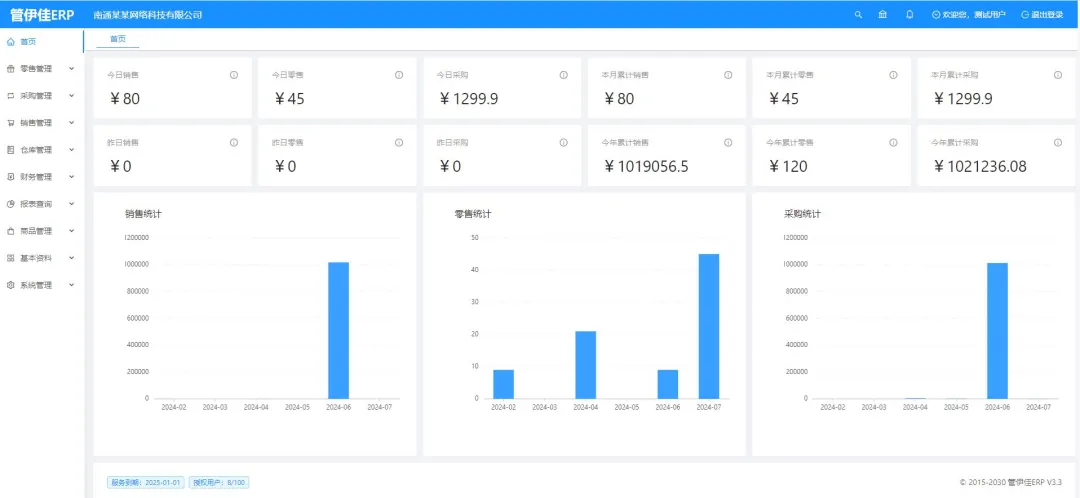
非常适合中小企业使用的开源ERP系统——JSH_ERP 今天,我想向大家推荐一个非常适合中小企业使用的开源ERP系统——JSH_ERP(原名:华夏ERP,英文名:jshERP)。这个项目不仅功能全面,还为开发者提供了极大的扩展和二次开发的空间。 2024-09-16T08:58:36.png图片 (首页) 项目概述 JSH_ERP 是一款基于 SpringBoot 和 Vue.js 的开源企业资源计划(ERP)系统,主要功能涵盖了进销存管理、财务管理以及生产管理。虽然目前功能集中在这些核心模块,但项目后续将推出更多完整的ERP功能。这个项目的开发初衷是为了帮助中小企业降低信息化成本,同时也为个人开发者提供了一个学习和二次开发的绝佳平台。 项目特点 1. 开源且灵活的架构 JSH_ERP 基于 SpringBoot 框架,结合 Mybatis 进行数据持久化,并且前端采用了流行的 Vue.js 框架和 Ant-Design-Vue 作为 UI 组件库。这种技术栈的选择不仅使得项目结构清晰、易于维护,同时也便于开发者根据需求进行二次开发。 2. 功能模块齐全 目前,JSH_ERP 主要提供以下功能模块: • 进销存管理:包括采购管理、销售管理、库存管理等,帮助企业高效管理供应链。 • 财务管理:实现了基本的财务报表功能,支持企业财务数据的录入和统计。 • 生产管理:覆盖了生产计划、生产进度等功能,适合制造业企业。 3. 前后端分离 JSH_ERP 采用前后端分离的架构,这使得前端开发者和后端开发者可以并行工作,提升开发效率。此外,前端使用的 Vue.js 框架与流行的单页应用(SPA)设计模式也使得用户体验更加流畅。 4. 易于二次开发 对于有二次开发需求的企业或个人开发者来说,JSH_ERP 提供了非常友好的扩展能力。你可以根据自身需求,灵活地修改或增加模块功能,而不必担心破坏原有系统的稳定性。 5. 全面的技术支持 项目不仅提供了详细的用户手册和接口文档,还分享了视频教程和部署指南,极大地方便了开发者快速上手和项目的实际部署。 功能截图 2024-09-16T09:01:47.png图片 (零售管理) 2024-09-16T09:01:50.png图片 (采购管理) 2024-09-16T09:01:56.png图片 (销售管理) 2024-09-16T09:02:04.png图片 (仓库管理) 2024-09-16T09:02:10.png图片 (财务管理) 2024-09-16T09:02:14.png图片 (报表查询) 2024-09-16T09:02:19.png图片 (商品管理) 2024-09-16T09:02:24.png图片 (基本资料) 2024-09-16T09:02:29.png图片 (系统管理) 总结 总的来说,JSH_ERP 是一个功能强大且灵活的开源ERP系统,特别适合中小企业。对于开发者来说,它提供了足够的二次开发空间,可以根据自己的需求进行定制。项目的技术栈也非常现代化,前后端分离的架构使得开发过程更加顺畅。如果你正在寻找一个易于上手的开源ERP系统,那么 JSH_ERP 绝对值得一试。希望这篇文章能够帮助大家更好地理解和使用这个项目,如果你对这个项目有兴趣,别忘了给它点个Star 哦! 仓库地址:https://gitee.com/jishenghua/JSH_ERP 部署文档地址:https://www.kdocs.cn/l/skPA3WycWXxg
-
纸飞机(可复制源代码) 640 (1).gif图片 源代码: <!DOCTYPE html> <html lang="en"> <head> <meta charset="UTF-8"> <meta name="viewport" content="width=device-width, initial-scale=1.0"> <title>纸飞机</title> <script src="https://cdnjs.cloudflare.com/ajax/libs/gsap/3.9.1/gsap.min.js"></script> <link rel="stylesheet" href="./22-纸飞机.css"> </head> <body> <svg xmlns="http://www.w3.org/2000/svg" viewBox='0 100 2100 1000'> <g fill='none' stroke='#674C99' stroke-width='15' stroke-linecap='round'> <line class="line" stroke-dashoffset="5208.54" stroke-dasharray="0 500 150 1150 200 604.27" x1="2723" y1="-83" x2="816.3" y2="1690.9" /> <line class="line" stroke-dashoffset="5372.94" stroke-dasharray="300 1000 200 1186.4" x1="2448.3" y1="-94.4" x2="408.9" y2="1654.3" /> <line class="line" stroke-dashoffset="5628.66" stroke-dasharray="200 1214.33 300 1100" x1="2187.4" y1="-87.6" x2="-38.7" y2="1634.3" /> <line class="line" stroke-dashoffset="5843.54" stroke-dasharray="10 490 100 1321.77 400 600" x1="1978.6" y1="-87.8" x2="-379.6" y2="1637.2" /> </g> <path class="shadow" fill='#674C99' d='M1528,665l-221.8,141c-2,1-2,5,0,7l120,60c2,1,4.6,0,5-1l101-201.2C1536.1,667,1531.7,663.1,1528,665z' /> <g class="plane-body"> <path fill='#56C2FF' d='M1131,516.3l297-38c3,0,5.6,4,2,6l-133,97c0,0-2,0.9-3,0l-163-58C1127,522,1127,516,1131,516.3z' /> <path fill='#6B6BD9' d='M1689,302l-349,423c-2,2.9-7,1-8-1l-40-138c0-1,0-3,1-5l390-284C1687,291,1692,297,1689,302z' /> <path fill='#9A9AE3' d='M1336,603.7l-2,119c0,2,3,4,5,1l349-423c2-2-1-6.7-4-4l-347,303C1336.6,602,1336,602,1336,603.7z' /> <path fill='#8FECFF' d='M1132,514l564-234c2,0,3,2,1,3l-266,195.8c0,0-0.6,0,0,0l-297,38C1130,518,1130,515,1132,514z' /> <path fill='#CDB3FF' d='M1705,279l-241,211.9c-1,0-1,2-0.7,3l116,239c1,2,4,2,5,0l124-451C1710,279,1707,277.8,1705,279z' /> <path fill='#AD81FF' d='M1341,597l120-104c1-1,3,0,4,0l115.8,238c1,2-1,4-3,3l-236-133c-4.8,2-4.8,0-3.8-2L1341,597z' /> </g> </svg> </body> <script> const planeBody = document.querySelector('.plane-body'); const shadow = document.querySelector('.shadow'); const lines = Array.from(document.querySelectorAll('.line')); planeTl = gsap.timeline({ repeat: -1 }) .to(planeBody, { duration: 1.5, y: 65, ease: 'none' }) .to(shadow, { duration: 1.5, scale: 1.2, transformOrigin: 'center center', ease: 'none' }, 0) .to(planeBody, { duration: 2.5, y: 0, ease: 'power2.out' }, 1.5) .to(shadow, { duration: 2.5, scale: 1, transformOrigin: 'center center', ease: 'power2.out' }, 1.5); lines.forEach((l) => { planeTl.to(l, { duration: 4, attr: { 'stroke-dashoffset': 0 }, ease: 'none' }, 0) }) </script> </html>
-
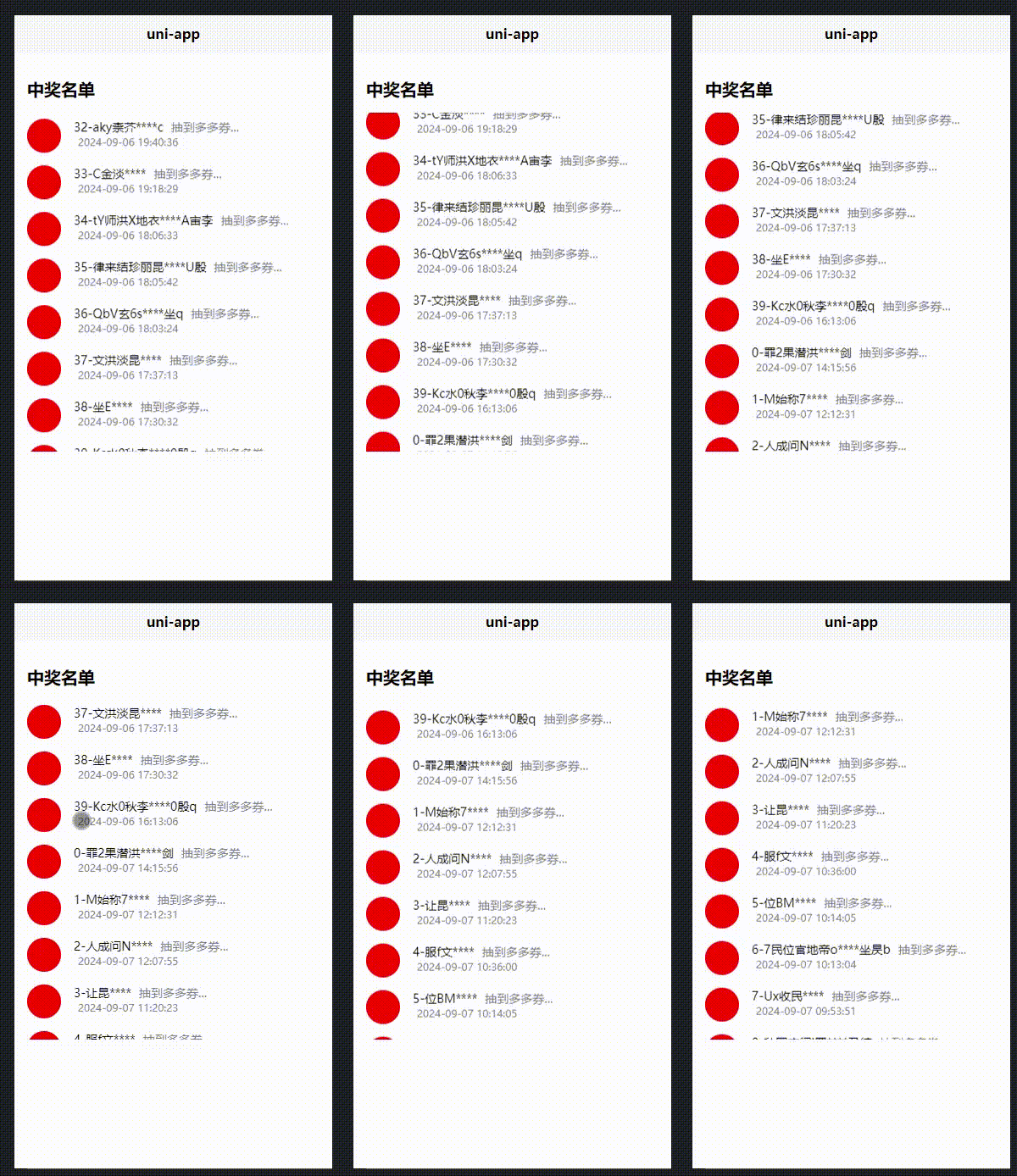
小程序纯CSS实现用户中奖名单无限滚动 + JS随机生成中奖用户名称 CSS无限滚动中奖人员名单,保持一个理念能用css实现的东西坚决不用js; 滚动的核心3个容器和animation动画 <template> <view> <!-- 外围容器 --> <view class="one"> <!-- 人员列表容器 --> <view class="two"></view> <!-- 重复人员列表容器是实现无缝滚动 --> <view class="two"> </view> </view> </view> </template> <style> .two { animation: myAnimation 16s infinite linear; width: 100%; } /* 滚动动画 */ @keyframes myAnimation { from { transform: translate(0px, 0%); } to { transform: translate(0px, -100%); } } </style>预览 640.gif图片 案例 可直接复制代码到uni-app项目中预览,或者手动修改for循环也可以在原生小程序中预览 <template> <view> <view class="title">中奖名单</view> <!-- 列表 --> <view class="swier"> <view class="swier-gun"> <view class="user-view" v-for="(item, index) in usernames" :key="index"> <view class="user-img"> <img class="all-img" src=""> </view> <view> <view class="user-name"> {{index}}-{{item}} <tex class="user-suo">抽到多多券...</tex> </view> <view class="user-suo user-time"> {{timeDatas[index]}} </view> </view> </view> </view> <!-- 重复人员名称实现无缝滚动 --> <view class="swier-gun"> <view class="user-view" v-for="(item, index) in usernames" :key="index"> <view class="user-img"> <img class="all-img" src=""> </view> <view> <view class="user-name"> {{index}}-{{item}} <tex class="user-suo">抽到多多券...</tex> </view> <view class="user-suo user-time"> {{timeDatas[index]}} </view> </view> </view> </view> </view> </view> </template> <script> export default { data() { return { usernames: [], timeDatas: [], }; }, onLoad() { // 用户名称 40是数量 this.generateNames(40); // 生产不大于现在的时间 this.generTiem(); }, methods: { // 用户名生成 getRandomChar() { const chars = 'ABCDEFGHIJKLMNOPQRSTUVWXYZabcdefghijklmnopqrstuvwxyz天地玄黄宇宙洪日月盈昃辰宿列寒来暑往秋收冬闰余成岁律吕调云腾致雨露结霜金生丽水玉出昆剑号巨阙珠称光果珍李柰菜重芥海咸河淡鳞潜羽龙师火帝鸟官人始制文字乃服衣推位让国有虞陶吊民伐罪周发殷坐朝问1234567890'; return chars.charAt(Math.floor(Math.random() * chars.length)); }, getRandomName() { const length = Math.floor(Math.random() * 10) + 5; // 名字长度在5到14之间 const halfLength = Math.floor(length / 2); let name = ''; // 生成前半部分 for (let i = 0; i < halfLength; i++) { name += this.getRandomChar(); } // 添加4个星号 name += '****'; // 生成后半部分 for (let i = 0; i < length - halfLength - 4; i++) { name += this.getRandomChar(); } return name; }, generateNames(count) { for (let i = 0; i < count; i++) { this.usernames.push(this.getRandomName()); } }, generTiem() { // 获取当前日期和时间 function getCurrentDateTime() { const now = new Date(); return now; } // 生成随机时间段(返回Date对象,不晚于当前时间) function getRandomTimeIntervalForTodayUpToNow() { const now = new Date(); const startOfDay = new Date(now.getFullYear(), now.getMonth(), now.getDate()); // 当天的开始时间 // 生成从startOfDay到now之间的随机时间戳 const randomTimestamp = startOfDay.getTime() + Math.random() * (now - startOfDay); return new Date(randomTimestamp); } // 生成40个随机时间段并按时间从大到小排序 function generateAndSortRandomDateTimes(num) { const dateTimes = []; for (let i = 0; i < num; i++) { const randomDateTime = getRandomTimeIntervalForTodayUpToNow(); dateTimes.push(randomDateTime); } // 按时间从大到小排序 dateTimes.sort((a, b) => b - a); // 格式化输出为 YYYY-MM-DD HH:MM:SS return dateTimes.map(date => date.toISOString().slice(0, 19).replace('T', ' ')); } const currentDateTime = getCurrentDateTime(); const randomDateTimes = generateAndSortRandomDateTimes(40); this.timeDatas = randomDateTimes; } }, }; </script> <style> /* 状态栏 */ .nut-navbar { background-color: #ffffff !important; } /* 顶部图片 */ .win-box-img { height: 600rpx; border-radius: 40rpx; overflow: hidden; margin: 30rpx; box-shadow: 2rpx 0 20rpx rgba(0, 0, 0, 0.5); } /* 标题 */ .title { margin: 60rpx 30rpx 30rpx 30rpx; font-size: 40rpx; font-weight: bold; } .swier { height: 800rpx; overflow: hidden; } .swier-gun { animation: myAnimation 16s infinite linear; width: 100%; } @keyframes myAnimation { from { transform: translate(0px, 0%); } to { transform: translate(0px, -100%); } } .user-view { display: flex; margin: 30rpx; } .user-img { width: 80rpx; height: 80rpx; border-radius: 200rpx; flex-shrink: 0; margin-right: 30rpx; background-color: red; } .user-suo { color: #777E90; margin: 0 10rpx; } .user-name { font-size: 28rpx; } .user-time { font-size: 24rpx; } </style>转载自枫瑞博客网